Showing posts with label dji. Show all posts

Thursday, February 16, 2017

Sentera Fully Integrates NDVI into DJI Phantom 4

dronelife.com
BY FRANK SCHROTH
FEBRUARY 15, 2017
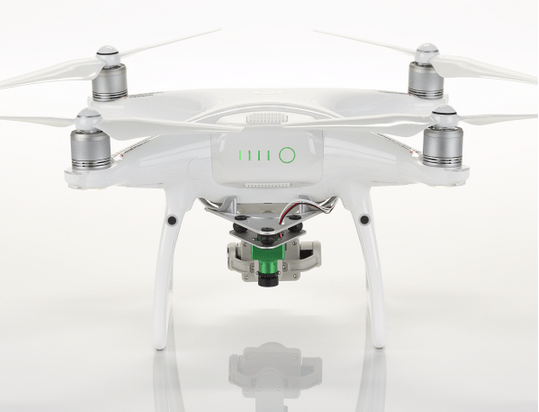


Sentera today announced its ability to convert a DJI Phantom 4 Pro drone into a tool that collects NDVI crop health data. By integrating the ultra-lightweight, super-precise Sentera NDVI Single Sensor onto the Phantom 4 Pro platform, agronomists and growers have a new tool for addressing crop issues. In a single flight, visual-band RGB, near-infrared (NIR) and normalized difference vegetation index (NDVI) data can be captured simultaneously, and then read immediately for instant insight and action.

“The timing couldn’t be better for our customers in the northern hemisphere! True NDVI technology can really boost their 2017 growth potential,” noted Kris Poulson, vice president of agriculture for Sentera. “In the next month, some growers will see their first crops popping up. Now is the optimal time to start using True NDVI data to make input decisions: while the plants are young and vigor can be influenced.”

The Sentera NDVI Single Sensor features a high-sensitivity global shutter imager and low-distortion optics for crisp, clear aerial RGB and NIR data collection — directly responsible for creating accurate NDVI maps. Sentera’s TrueNDVI solution captures, and then seamlessly flows data into Sentera AgVault™ software, where additional analytics can be performed, data is cataloged and stored, and ready to leverage immediately and for instant action — at the field edge, or across the country.

“The 2016 growing season really proved the value of TrueNDVI for our customers with DJI Phantom and Inspire products,” Poulson continued, “For the first time many growers could analyze data they never thought possible to even capture, and the progression continues into 2017 with the Phantom 4 Pro NDVI upgrade. The ability to visually assess crop health with TrueNDVI — and to do it reliably and efficiently — completely changes the game for the grower, the agronomist, and anyone managing large-scale operations.”

Sentera’s TrueNDVI upgrade leaves the factory-supplied DJI Phantom 4 Pro gimbaled camera untouched, preserving the full functionality of its 1-inch 20-megapixel stock sensor.

Existing Phantom 4 Pro drones can be sent directly to Sentera or a Sentera-authorized reseller for modification. Growers who want to obtain a new Phantom 4 Pro drone with NDVI capabilities can purchase an integrated system directly through Sentera or its resellers. The full package is available for pre-order here for $4148. According to web site, orders will ship in March of 2017.


Read more:

Thursday, February 9, 2017

DJI Introduces Useful New Accessories For Mavic Pro Drone

dronelife.com
FEBRUARY 8, 2017


from DJI


DJI is beginning to turn increased attention to its Mavic drone with the release of products intended to make flying safer, more convenient and fun.

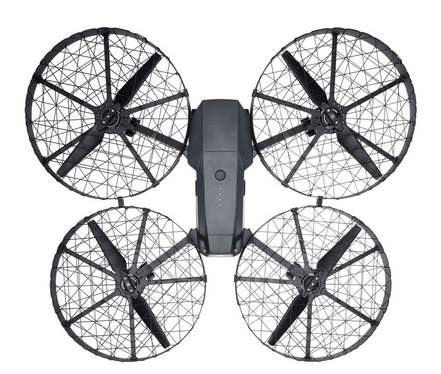
Two new products are designed to shield the Mavic Pro’s propellers, providing an extra measure of safety and protection during flight. The Propeller Guard places a barrier just around the propellers while the Propeller Cage mounts on the Mavic Pro’s arms and completely encircles a set of slightly smaller 7728 Quick-Release Folding Propellers.

The Propeller Cage is ideal for novice operators or those learning to master their flying skills. With the additional weight of the Propeller Cage, the Mavic Pro has a maximum flight time of up to 12 minutes and it is recommended to be flown in Tripod mode for better precision and stick control. Both solutions help to protect the aircraft’s propellers especially in tight spaces and other locations where the Mavic Pro may fly in close proximity of objects.

The new Advanced Battery Charging Hub for Mavic Pro is a smart, quick and reliable way to charge up to four Intelligent Flight Batteries in a single session. The Intelligent Flight Batteries will be charged in sequence according to their power levels, from high to low. It is also compatible with the Phantom 4 series 100W charger that can further reduce the charging time.

A new Aircraft Sleeve provides Mavic Pro owners additional peace of mind when carrying and storing their drone. The sleeve is custom-designed to nestle the Mavic Pro in its soft interior padding, helping to minimize the risk of external scratches and other damage, as well as keeping it free of dust during storage.

Other accessories designed for outdoor aerial enthusiasts include a new remote controller monitor hood, giving operators a better view of what they are shooting under direct sunlight, and ND Filters which can be easily attached to the camera gimbal, allowing more control of the camera’s aperture, exposure time and sensor sensitivity settings.

Full details on all Mavic Pro accessories are available here.

All products are available immediately unless otherwise stated:
Propeller Cage: AUD269
7728 Quick-Release Folding Propeller: AUD16
Propeller Guard: AUD26 (available at a later date)
Battery Charging Hub (Advanced): AUD89
Aircraft Sleeve: AUD12


Read more:

Wednesday, February 1, 2017

GS Pro: The New Standard for Drone Mission Planning and Control by DJI

suasnews.com
By Press
1 February 2017


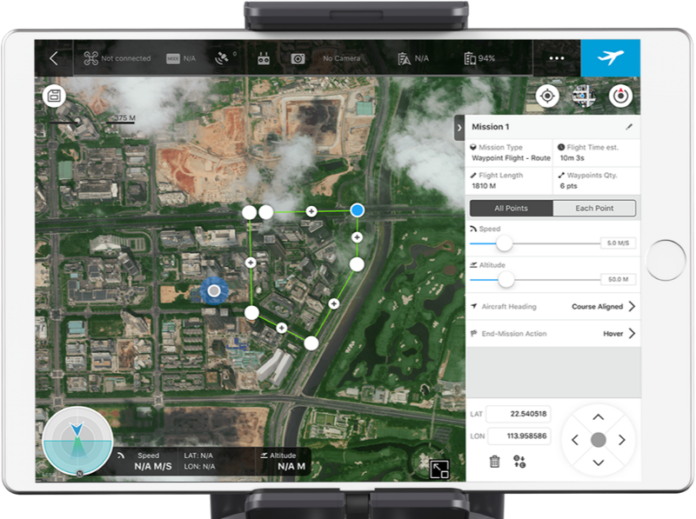
GS Pro (or Ground Station Pro) is the latest app for iPad developed by DJI to plan and control complex drone missions and perform automated flights with DJI aircraft. GS Pro demonstrates DJI’s expansion into enterprise market by including many features aimed at increasing safety, accuracy and efficiency in various industrial applications.

Over the last few months, the Propeller team have been field-testing GS Pro in real missions such as 3D aerial surveys, precision mapping and drone inspection flights. In this post we are sharing our experience of using the app and our key takeaways.

First impressions:

At first glance, GS Pro looks fairly similar to Map Pilot from Drones Made Easy and other flight planning apps on the market. Just like the others, you can set the survey boundary, front- and side-lap % and flight altitude, and GS Pro will estimate the flight time and Ground Sample Distance (GSD).


However, GS Pro has some additional features that allow you to optimise the image capture configuration for common industrial missions:
Very easy to save and reuse missions. For fixed sites which demand regular monitoring, this takes all the guesswork out of flights after the first successful mission.

Images can be taken at equal distance intervals or equal time intervals. We found this to be a very useful feature for inspections.
The camera angle can be set at a 0–90 degree range from facing straight down to forward. This can be particularly useful if you need consistent obliques of a terrain, like when for surveying quarry pits or benches.

When the drone has a DJI Zenmuse X5 camera with interchangeable lenses, you can can adjust the lens focal length with the estimated GSD automatically updated.

‘Nice to have’ features:


Based on our field tests, there are a few other features we would like to see added in future releases of GS Pro.
Battery count. Some apps (like Map Pilot) offer you an estimate of how many batteries you need to fly a certain area. This is a very useful feature especially for new pilots.

An Intelligent “return to home” mode that estimates the current level of battery charge during longer flights and returns ‘home’ when it determines the battery should be replaced.

Estimating the total area of a mission in hectares and/or acres.


Being able to import a terrain surface from a previous flight to allow more precise terrain following for consistent GSD. Many sites with significant vertical drop off will suffer from variable GSD if the site is pressed into a mountain, for example.

Being able to import an up-to-date orthophoto to plan missions off. If sites are rapidly changing, it is easy to set the flight boundaries incorrectly based on the footprint of the site when the DJI map was captured.

There isn’t a mode for orbit or vertical mapping missions. We have been told that this is on the road map, but as there are no other solutions available today, we see this as a really important next step, especially if it can integrate the advanced collision avoidance of the Phantom 4 Pro.

App usability:


GS Pro features an intuitive user interface which makes drone mission planning pretty easy, even for beginners. When you enter GS Pro it will ask you to create a new mission by selecting one of 3 options — Virtual Fence, 3D Map Area and Waypoint Route. Simply select any of the mission types, specify the area you would like to cover and then tap to set the flight options.

The recommended options are mostly acceptable if the user is trying to achieve good quality maps through a service like Propeller. We recommend adjusting front and side overlap to between 60–80% based on

a) how much area needs to be covered,
b) the level of quality required, and
c) importantly, the speed of the internet connection available to upload this data. Often, actionable data delivered quickly is preferred over very high resolution data delivered slowly.

Many of the advanced settings of the application are not well explained, and can lead to confusion — for example, the setting ‘Flight Course Mode’ gives two options: Scan Mode and Inside Mode. This language is quite vague — but you should know ‘Inside Mode’ means the drone will pause every waypoint for a few seconds.
Once you have completed your setup, GS Pro will upload the configuration data to your drone.

In-flight performance:


During the flights we noticed that the drone follows its path very precisely. At every corner or a turn point the aircraft holds its position for a second or two before continuing its flight. This slows down the drone significantly and we would expect this to be an area of improvement for the app.

The drone faces the same direction during the entire flight (either parallel or perpendicular) to the main flight lines, and this is very convenient during the data post processing phase.

Some hurdles:

During some missions the drone would suddenly stop shooting, which we found a bit frustrating. If you hear that shutter sound has stopped, just press the photo button on the remote control again to continue taking pictures.
If you encounter unexpected obstacles during a mission , you can dynamically re-configure the path and upload. However, when testing this we found that the drone stopped taking images even though the shutter button was pressed. We hope this issue will be fixed in future versions.

The application is still in beta and it can cause your iPad to slow down, freeze or shut down. This can be expected with a first release and we trust that DJI will fix this with priority.

Conclusion:

GS Pro provides full support for all DJI products and makes planning surveys or inspections a simple process. Using GS Pro is compliant with the DJI warranty, giving you additional peace of mind in the advent of a software/mechanical malfunction.
The GS Pro autopilot system works very well and the aircraft flies precisely along the pre-designed flight path. Equal time and distance shooting option is extremely useful, although we experienced several shutter lags while using this mode.

Overall, we found this new app very powerful when used for a range of typical commercial drone missions. Coming from a major vendor like DJI we expect there be frequent fix releases and software upgrades.

If you have any further questions about drone mission planning, email us at support@propelleraero.com.au

Learn more about Propeller:


Find out how Propeller can help you to capture, analyse and share accurate drone data. Visit propelleraero.com to start your free trial or schedule a free demo with one of our drone experts.


Read more:

Monday, January 16, 2017

Farewell Phantom 3 Pro, DJI discontinue some of Phantom range

suasnews.com
By Gary Mortimer
14 January 2017


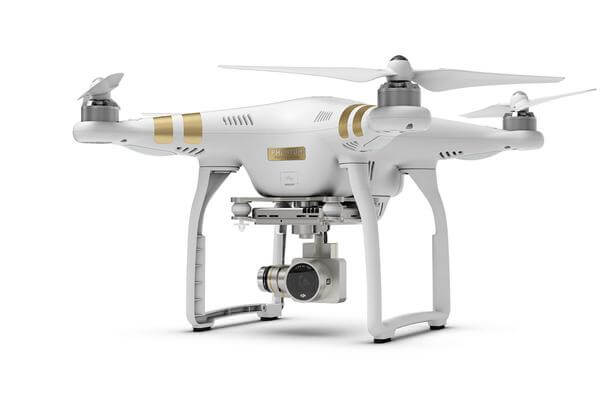
The Phantom 3 Pro and Advanced have been removed from DJI’s store.

For a little while the P3P represented the best bang for buck in the Phantom range. It has been my recommendation when asked, since the Phantom 4 was released. Great performance and able to do everything the Phantom 4 Pro could for half the price (almost).

Arriving in the marketplace in early 2015, the Phantom 3 Professional was quite a step forward. A Lightbridge downlink and Sony EXMOR 1/2.3” camera made better images simple to frame from a greater distance.

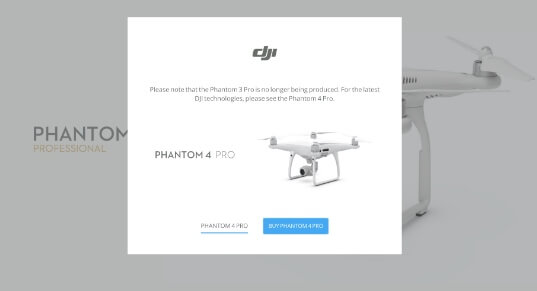
In the DJI store, only the Phantom 3 standard, Phantom 4 and Phantom 4 Pro are now available to buy.


You can now only get refurbished and aircraft-only Phantom 3 Pro deals. Earlier this graphic was showing:


I see this one now:


The P3 Standard and Mavic are the new entry-level drugs, and I can’t see why you would buy a Phantom 4 for commercial work, the P4 Pro is just so much better.

Does DJI have another quadcopter just around the corner to soothe commercial drone operators’ brows? Is the Phantom 5 coming??

Are sales dropping, making it time to rationalise the range?

Have DJI signaled the end of the consumer drone boom? I was calling it before Christmas but more than one pundit called me out on that. They believe it is at least two years away.

Am I the only person sad to see the Phantom 3 Professional dropped by DJI? Should it not have gone with a farewell press release from HQ?

I know, no point in being sentimental, the Phantom 3 Pro has launched very many successful commercial drone businesses around the world. An honourable innings.


Read more at:

Monday, January 9, 2017

DJI Drone Cameras – The right camera for the job, and why I use the X3


droneblog.com
By Droneblog Editor
January 9, 2017


I am biased. Since I began flying drones about two years ago, I have been flying DJI products the entire time, and because of that, I am only going to write within my scope of experience (because we’ve got enough clowns out there writing about things that they know nothing about!), which is to say, I am going to write about DJI cameras only. While I am not very stoked about their customer service, DJI offers an incredible package for the price, and their cameras are just getting better and better. Here is the question: How do we as photographers and videographers know which one is the right tool for the job?


Historically Speaking…

I have completed approximately 107 drone jobs since founding Southern Oregon Drone (I am not counting the ~40 or so I did working for a real estate agent when I first started out) and I have never been turned down for a job because my camera was insufficient (save one time when a competitor showed up to my paid gig with a drone much bigger and ‘cooler’ looking to my client, but that story is for another day) . When I first founded Southern Oregon Drone, I saved up and bought a DJI Phantom 2 Vision + (the same model I had used while working for the real estate agent) and used that for a few months. I used the Vision + camera to film a variety of interesting videos, including a collection of stock footage filmed around Oregon for a customer I found through Reddit, the Gorge Flyboard tutorial video, a collection of videos filmed over Shasta Lake, and a video of a mountain biker riding all over Roxy Ann Peak. In fact, the mountain biking video was featured on the Medford Parks and Rec website, and led to some pretty big contracts later down the road!

The Vision + camera did an OK job, but I never took photos because of the fisheye lens, and all my videos had to be rendered within a black box to fit regular video players at 1080P. I would not recommend offering any kind of drone photography or videography services with this camera, though I doubt that will be an issue since that drone is no longer in production. I only used this one for a handful of jobs, and every cent I earned went towards upgrading to something better as fast as I could.

After the Vision + I moved onto the Phantom 3 Pro. I am still of the opinion that the DJI Phantom 3 Pro is THE best drone for the money that DJI has ever made (disclaimer: I have yet to try a Phantom 4/Mavic). The image quality is virtually the exact same as the X3 on the Inspire, and I truly believe the gimbal system is better on the 3 Pro than the Inspire. The 3 Pro gimbal always kept the horizon flat when flying full-speed sideways, unlike my Inspire X3 which ends up tilting a bit. I have since had to change my shooting style to avoid high-speed sideways flight, and I have thought more than once about picking up a Phantom 3 Pro again just for those types of shots. I don’t operate with a backup as of now, but if I ever do, the 3 Pro will be a main contender for the spot. The 3 Pro is also MUCH more compact and easy to transport into challenging environments than the Inspire. All work on the Jones Bikes videos was filmed with the 3 Pro, and I had to bike that drone in a backpack all the way up into the mountains. All work done between August 2015 and May 2016 was done using the 3 Pro.


Understanding Your Market

Before selecting a camera, it is important to understand who it is that is providing the most revenue NOW (you may be seeking to serve other markets which may require different equipment, but focus on optimizing your current check writers first). The majority of my work is in real estate, with various jobs here and there in other industries. I work with producers from time to time as well, and admitedly they are a little more particular about equipment. But when they contact me, they have always already looked through my portfolio and have deemed my work to be of high enough quality. Which leads me to my next point…


Which DJI drone camera do I currently use?

Today I use the Inspire 1 with a regular old X3 hanging from it. DJI has since released a variety of new cameras, including the Z3, X5, X5R, and now the X4 and X5S for the Inspire 2. Could I afford to upgrade to an X5, X5R, or even to the new Inspire 2? Yes. Will I? No. At least not right now.

This is what this article boils down to. The vast majority of my clients – excluding some hollywood and national TV level producers – will not care if I am using an X5 or an X3. In fact, most of them couldn’t even tell the difference. The X3 currently costs between $450 and $500 online. The X5 is more than 3x the price at $1800. As a business decision maker, the cost does not justify the benefits.

Think you need the X5 in order to be competetive? Think again. Here are some clients that have hired me, and for whom I filmed with the X3:

–HGTV on 4-day shoot for an episode of Beach Hunters in Seaside, Oregon
Garmin on a 2-day shoot for a series of web-based lifestlye videos for their fitness watches
Lexus on a 12-hour shoot filming their cars along the Oregon Coast


If these national and international brands were happy with the X3 footage, is an upgrade necessary? Too often I see amateur and professionals alike using the excuse that their equipment is holding them back. This is just that – an excuse. Heck, if these clients were happy with the X3, the camera on the Phantom 3 Pro would have provided the same image. We all know a professional photographer could do some pretty incredible things with a Canon Rebel and a kit lens, just like an amateur could take some bad photos with a Canon 5D. DJI cameras are no different.

I want to clarify: the X5 IS a better camera and if you have it already or can spare the $1800, you should get it. Photos are larger, low light settings are much better, and the image quality – especially to a professional eye – is improved. But this will cost you flight time due to increased weight, and you’ve essentially doubled your financial risk by flying the X5 on your Inspire. Watch out for the trees… for real!

(If you are wondering why I have not brought up the X5R, it is because that camera is truly overkill for what I do, and what most commercial drone operators do. Even the documentary and TV commercial filmmakers I work with wouldn’t need Cinema RAW. It is extraordinarily expensive, as is the solid-state memory needed for it. I would only ever go with the X5R when filming for a Hollywood-calibre piece)

I do, in fact, offer an upgrade option to clients who want the benefit of a Micro 4/3 camera and lens options. I usually just pass along exactly what the rental company is charging me for the rental, plus a little hazard fee if I am flying over water. My Inspire 1 is fitted with the adapters for the X5, but I have yet to have any client take me up on this offer. Some have expressed interest, but at the end of the day they elect to have me use the standard X3 because they just don’t find the X5 upgrade worth the money. And yes, every firm that has asked about the X5 has had the financial ability to upgrade.

​Truth be told, I will probably upgrade to the X5 at some point this year, but it has more to do with my own desire to have a micro 4/3 camera in the air than it does to please clients. Put another way, there is still not a great demand for the X5 from my client base, so investing in one really won’t provide any greater of a return than my current X3. The reason I want to acquire an X5 is for its improved low-light capabilities and 16MP photos, as well as for ground-based shooting with my Osmo.

At the end of the day, professional drone photographers need to think of their operation as a business, because it is a business. Don’t get caught up in the flashiest, coolest, newest, bestest gear if it is not the right tool for the job. Determine your clients’ needs and invest in the equipment that will satisfy them.


Read more at:
http://droneblog.com/2017/01/09/dji-drone-cameras-the-right-camera-for-the-job-and-why-i-use-the-x3/